
If you've ever downloaded an image from a modern website and found that it won't open in Photoshop, won't upload to your CMS, or shows a broken file icon on your desktop, there's a good chance it's an AVIF file. AVIF is one of the newest image formats on the web, and while it's excellent for page speed, it causes real friction the moment you need to edit, print, email, or upload that image somewhere that only accepts JPG.
I ran into this while managing product photos for a client's e-commerce catalog. Their photographer had switched to exporting AVIF to save storage, and within a week the design team couldn't open half the files in their usual editors. That's what pushed me to keep a dedicated AVIF to JPG converter on Asli Tools. This guide covers what I learned about the format — why it exists, when you actually need to convert it, and how to do it without wrecking image quality.
What is an AVIF file, exactly?
AVIF (AV1 Image File Format) is a next-generation image format built on the same compression technology used in AV1 video. Google, Netflix, and several major browser vendors backed it because it compresses images far more efficiently than JPG or even WebP — often around 50% smaller at similar visual quality.
That efficiency is why so many websites now serve AVIF. Faster loads help Core Web Vitals, SEO, and hosting costs. From a site owner's point of view, AVIF is a clear win.
The problem shows up on the other side: compatibility. A lot of everyday tools still don't recognize .avif, including:
- Older versions of Microsoft Office and Windows Photo Viewer
- Many versions of Adobe Photoshop and Illustrator
- Email clients and messaging apps
- Print shops and signage software
- Some social media and CMS upload forms
That's when converting AVIF to JPG becomes necessary, not optional.
AVIF vs JPG: which one should you actually use?
It's worth understanding this before you convert anything, because you'll probably keep both formats around depending on the job.
AVIF wins when:
- You're publishing images on a website and want faster load times
- Storage space or bandwidth costs matter
- The browser or platform you're targeting supports it (most modern browsers do)
JPG wins when:
- You need universal compatibility with editors, printers, or older devices
- You're sharing files with people who might be on outdated systems
- You're uploading to a platform that explicitly requires JPG or PNG
In practice, keep AVIF for web delivery and convert to JPG whenever the file needs to leave that website context. Neither format is "better" in an absolute sense — they're built for different jobs.
How to convert AVIF to JPG (free, in your browser)
The fastest reliable way to convert AVIF to JPG without installing anything is a browser-based converter. Here's the process using the AVIF to JPG tool on Asli Tools. Conversion runs locally in your tab, so the image isn't uploaded to a server.
Step 1: Select your AVIF file
Open the AVIF to JPG converter and click Select AVIF files, or drag the file onto the page. You can also pull a file from Google Drive or Dropbox if that's where it lives. No account is required.
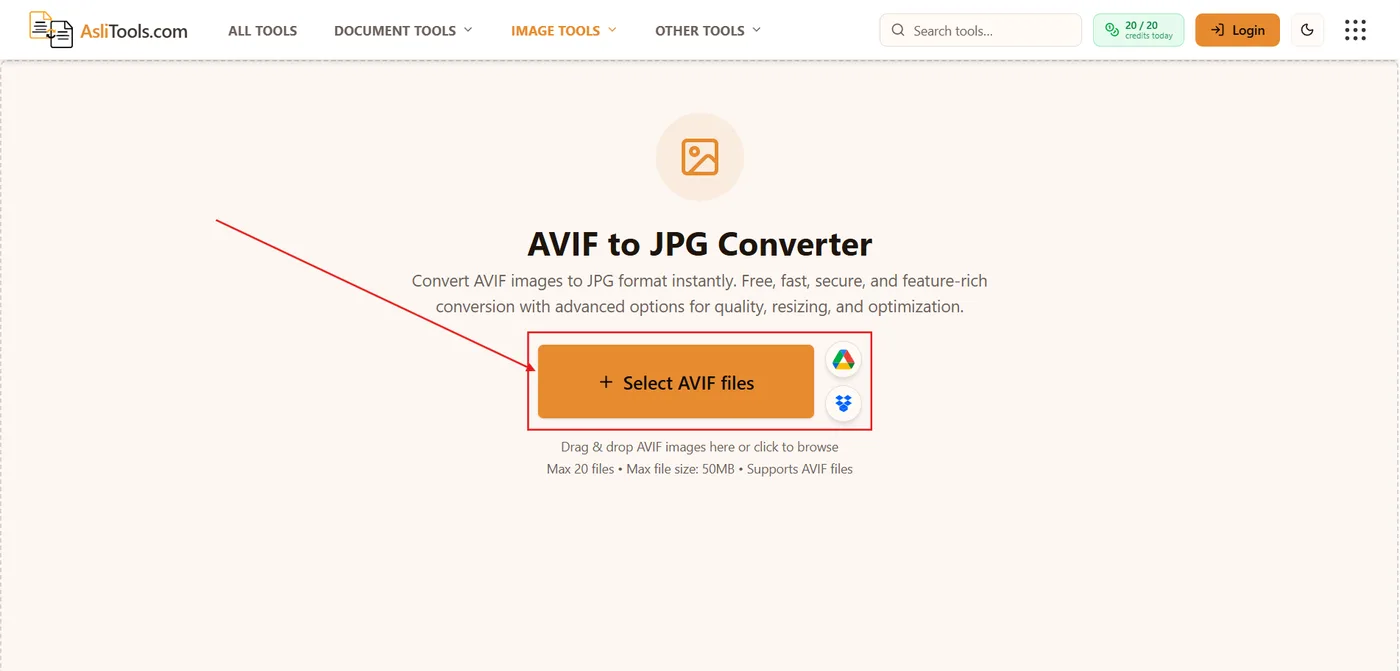
If you're converting more than one product photo or export, add them in one session. The tool accepts a batch (up to the usual file and size limits), so you don't have to repeat the process for every image.
Step 2: Set JPG quality
Once the file is loaded, use Conversion Settings on the right. The quality slider defaults to 90%, which is a solid balance between file size and sharpness for photos, blog images, and catalogs.
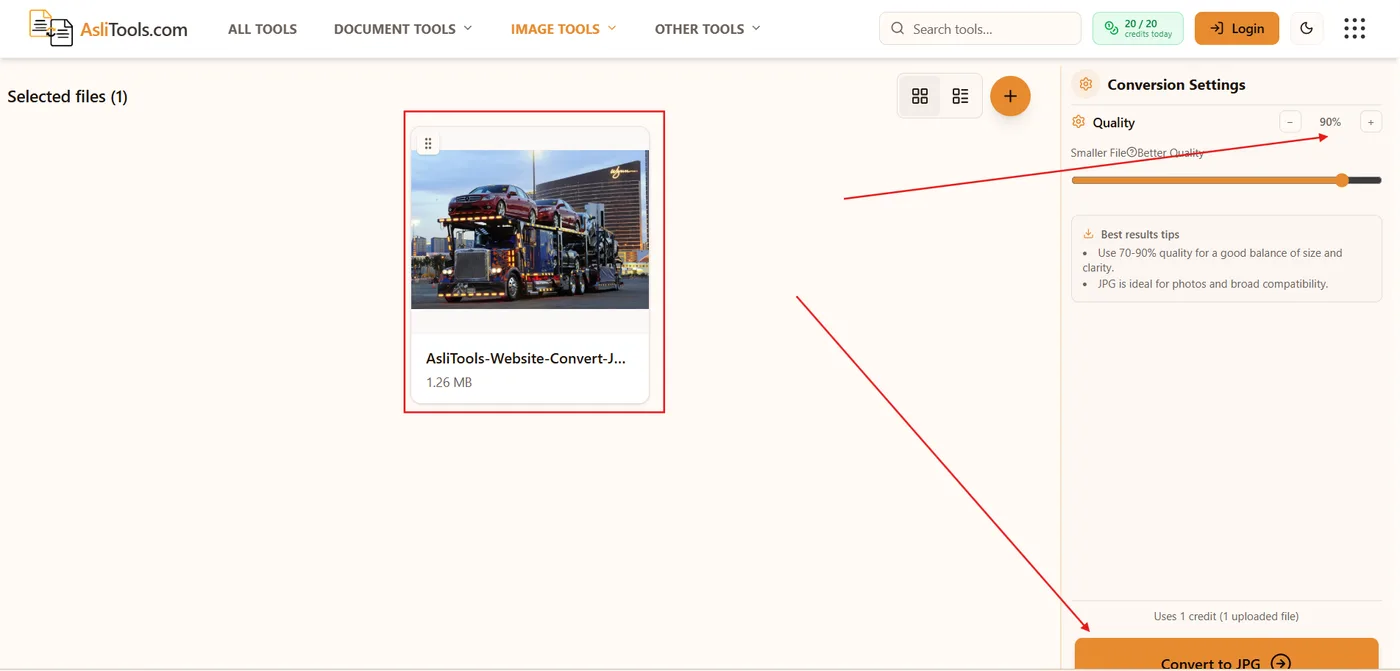
Drop toward 70–80% if you only need a smaller email attachment. Stay near 90–100% if the JPG is going to print or into design software. JPG is the right target format here because it's universally accepted for photographs.
Step 3: Convert and download
Click Convert to JPG. The file is re-encoded in the browser in a few seconds. When you see Conversion complete, download the .jpg and open it in any app that rejected the original AVIF.
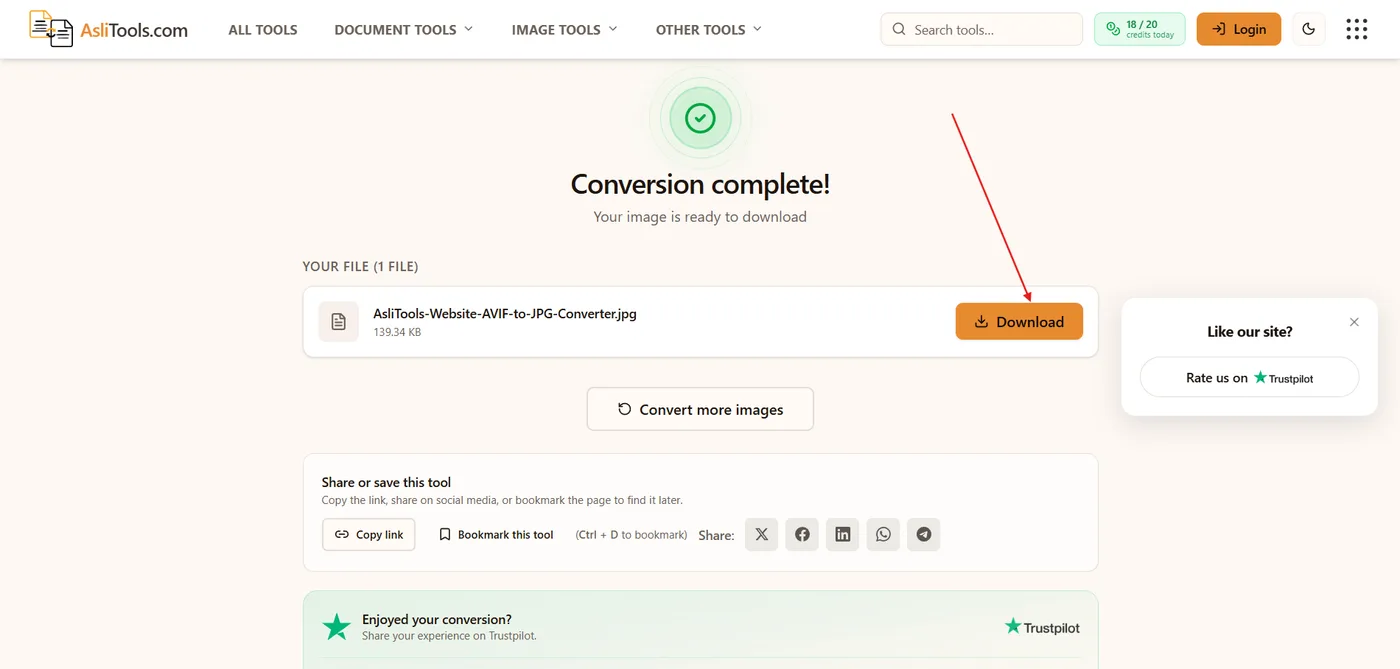
No watermark, no email link, no signup.
Converting AVIF to JPG on iPhone or Android
The same page works in Safari or Chrome on your phone. Upload from your camera roll or Downloads folder, convert, and save the JPG back to the device. You don't need a separate app just to open one image.
Converting AVIF to JPG on Windows or Mac
On desktop you have two realistic options:
- Online converter (recommended for most people): No install, works on any OS, and handles the conversion in the browser.
- Command-line tools (for developers):
ffmpegorlibavifcan batch-convert hundreds of files in a script or build pipeline.
If you aren't already comfortable in a terminal, the browser tool is faster and avoids setup.
Does converting AVIF to JPG reduce image quality?
A little, but it's rarely noticeable in everyday use.
JPG uses lossy compression, so converting from AVIF (also typically lossy, but more efficient) means re-encoding the pixels. A converter that keeps the original resolution and uses a high JPG quality setting — 90% is the default on Asli Tools — keeps the difference invisible for product photos, blog images, social posts, and printed documents at normal viewing sizes.
If every pixel matters, such as a portfolio master, keep the original AVIF and treat the JPG as a compatibility export, not a replacement.
Why won't my AVIF file open?
If you landed here because a file simply won't open, it's usually one of these:
- Your software is outdated. AVIF support only landed in many apps in the last few years.
- Your OS viewer doesn't handle AVIF yet. Windows added native support gradually, so results vary by version.
- The upload form has a strict allowlist that includes JPG and PNG but not AVIF.
Converting to JPG solves all three, because JPG has been universally supported for decades.
Batch converting multiple AVIF files
If you have a whole folder — a migrated gallery, a media library cleanup, or a catalog update — convert them in one session instead of one file at a time. Select every AVIF on the AVIF to JPG converter, set quality once, and download each JPG (or grab them as they finish).
The reverse: converting JPG to AVIF
If you manage a website and want faster pages, converting existing JPGs to AVIF can shrink page weight. The trade-off is visitor compatibility, so many sites serve AVIF with a JPG fallback using the HTML <picture> element. Use the JPG to AVIF converter when you're optimizing for the web, and keep JPG for anything that has to work everywhere.
Need a lossless-style raster instead of JPG? The AVIF to PNG converter is the better path when you need transparency or a format that won't add another generation of JPEG artifacts.
Related tools on Asli Tools: AVIF to JPG, AVIF to PNG, JPG to AVIF, JPG to WebP, and image conversion tools.
Working with Windows .jfif downloads instead? See why photos save as JFIF and the JFIF to PNG guide.