


Watch how it works
How to convert TXT to Word
Watch how to turn a plain text file into a formatted Word document with the Asli Tools TXT to Word converter.
Бесплатный конвертер TXT в Word без регистрации - .txt в DOCX онлайн
Конвертируйте TXT в Word бесплатно онлайн. Загрузите .txt, выберите DOCX или DOC и скачайте сразу без регистрации. Приватная обработка в браузере с распознаванием заголовков, списков и таблиц.
Нужен быстрый и действительно бесплатный конвертер TXT в Word? Этот инструмент превращает текстовые и Notepad-файлы в DOCX/DOC прямо в браузере. Без аккаунта и без установки программ.
What is TXT to Word Conversion?
TXT to Word conversion is the process of transforming plain text files (.txt) into Microsoft Word document formats (DOCX or DOC). Plain text files are simple, unformatted files that contain only text characters - no bold, italics, colors, or complex formatting. Word documents, on the other hand, support rich formatting, tables, images, and professional styling. Converting TXT to Word allows you to take your plain text content and turn it into a properly formatted, professional document that's ready for editing, sharing, or printing. This is especially useful when you have notes, data files, or documents in plain text format that need to be converted to Word for better presentation and editing capabilities.
Why Choose Our TXT to Word Converter?
There are many TXT to Word converters available online, but ours stands out for several important reasons. First and foremost, it's completely free - no hidden fees, no watermarks, no subscription required. Unlike some converters that add watermarks or limit file sizes, our tool gives you unlimited conversions with full access to all features. Second, your privacy is guaranteed. All conversion happens entirely in your browser - your files never leave your computer, never get uploaded to any server, and never get stored anywhere. This means your sensitive documents remain completely private and secure. Third, our converter is incredibly fast and efficient. Even large TXT files convert in seconds, and you can process multiple files at once with batch conversion. Finally, we offer advanced features that many other converters don't - automatic heading detection, table recognition, customizable fonts and formatting, and support for various text encodings.
Как конвертировать TXT в Word
Весь процесс занимает меньше минуты:
Загрузите файл
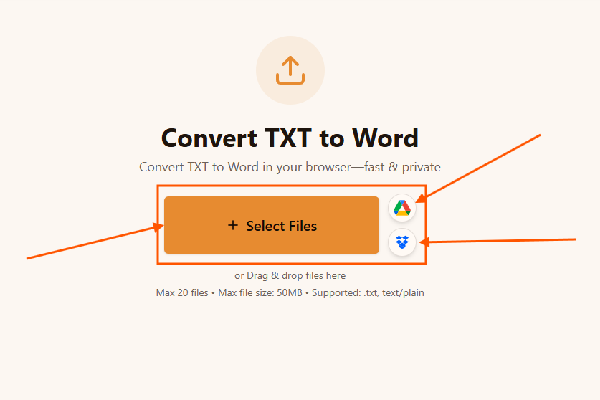
Загрузите файл в конвертер TXT в Word. Перетащите файл .txt на страницу или нажмите для выбора. Если текст использует нестандартную кодировку, выберите подходящий вариант (для большинства файлов подходит UTF-8).
Настройте вывод
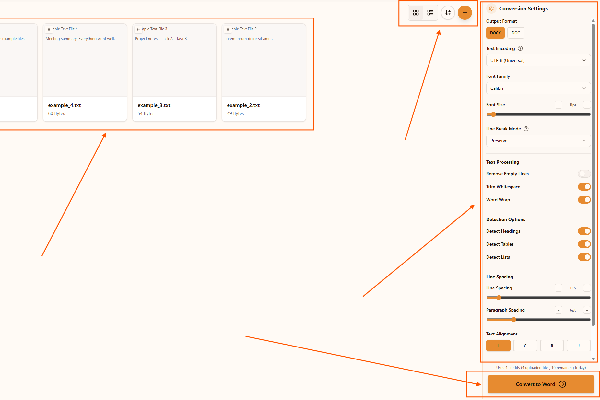
Настройте вывод в конвертере TXT в Word. Выберите DOCX (рекомендуется) или DOC, задайте шрифт, интервалы и выравнивание и включите распознавание заголовков, списков или таблиц, если они есть в тексте.
Конвертируйте и скачайте
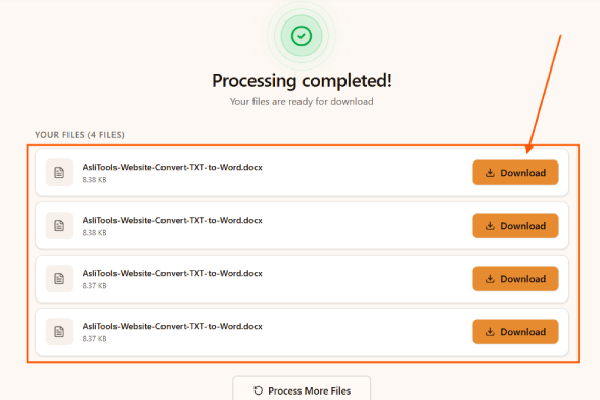
Конвертируйте и скачайте с помощью конвертера TXT в Word. Нажмите «Конвертировать в Word» — документ создаётся в браузере и готов к скачиванию и открытию в любом текстовом редакторе.
How do you convert a txt file to word?
Converting a TXT file to Word is simple with our online converter. Just upload your .txt file, choose your preferred Word format (DOCX or DOC), adjust any formatting settings you want, and click convert. The entire process takes just seconds, and your Word document will be ready to download immediately. No software installation needed, no registration required - just upload, convert, and download.
Как бесплатно конвертировать текст в Word онлайн?
Вставьте текст или загрузите текстовый файл, выберите DOCX или DOC и нажмите конвертацию. Word-файл создается в браузере и сразу готов к скачиванию.
Можно ли конвертировать Notepad (.txt) в DOCX без регистрации?
Да. Загрузите файл Notepad или TXT, оставьте DOCX как формат вывода и конвертируйте мгновенно. Всё работает без регистрации и обрабатывается в браузере.
Получу ли я .docx для скачивания сразу?
Да. После конвертации файл сразу доступен для скачивания в формате DOCX (или DOC, если нужен старый формат).
Сохраняются ли параметры форматирования в этом text to Word конвертере?
Перед конвертацией можно настроить шрифт, интервалы, выравнивание и распознавание заголовков/списков/таблиц, чтобы результат соответствовал нужной структуре.
Powerful Features of Our TXT to Word Converter
Our TXT to Word converter comes packed with features that make it the best choice for converting text files to Word documents:
- Multiple Output Formats: Choose between DOCX (modern Word format, recommended) or DOC (older Word format) depending on your needs. DOCX files are smaller, more reliable, and support advanced features, while DOC format ensures compatibility with older versions of Microsoft Word.
- Advanced Formatting Options: Customize every aspect of your Word document. Choose from various font families (Calibri, Arial, Times New Roman, and more), adjust font sizes, set line spacing and paragraph spacing, choose text alignment (left, center, right, justified), and configure word wrap settings. You have complete control over how your converted document looks.
- Automatic Heading Detection: Our converter intelligently detects headings in your text file. It recognizes markdown-style headings (lines starting with #), all-caps text, and short lines that appear to be headings. These are automatically formatted as proper Word headings, making your document more professional and easier to navigate.
- Smart Table Recognition: If your TXT file contains tabular data, our converter can automatically detect and convert it into proper Word tables. It recognizes tab-separated values, pipe-separated data, and space-separated columns, transforming them into formatted tables that are easy to read and edit in Word.
- List Formatting: Automatically detect and format lists in your text file. Numbered lists, bulleted lists, and other list formats are properly converted to Word list styles, maintaining proper indentation and formatting.
- Text Encoding Support: Handle TXT files with different character encodings including UTF-8 (most common), UTF-16, ASCII, and Latin-1. This ensures that special characters, international characters, and symbols are properly preserved during conversion.
- Batch Processing: Convert multiple TXT files to Word documents at once. Upload several files, configure your settings once, and convert them all in a single batch. You can download individual files or all files together as a ZIP archive.
- Line Break Handling: Choose how line breaks are handled during conversion. You can preserve original line breaks, normalize them, or convert single line breaks to double line breaks for better paragraph separation.
- Text Processing Options: Clean up your text during conversion with options to remove empty lines, trim whitespace, and control word wrapping. These features help create cleaner, more professional Word documents.
- Additional Document Features: Add page numbers, create a table of contents automatically, and include other professional document elements. These features make your converted Word document ready for formal use.
- 100% Privacy and Security: All conversion happens entirely in your browser. Your files never leave your computer, never get uploaded to any server, and never get stored anywhere. This ensures complete privacy and security for sensitive documents.
- Completely Free: No hidden costs, no watermarks, no file size limits, no usage restrictions. Our TXT to Word converter is completely free to use with all features available at no cost.
When to Use TXT to Word Conversion
There are countless situations where converting TXT to Word is useful. Here are some of the most common scenarios:
- Academic Work: Students often receive assignments or notes in plain text format. Converting these TXT files to Word allows them to format their work properly, add proper headings, create tables, and submit professional-looking documents.
- Business Documents: Many businesses work with data exports, logs, or reports in TXT format. Converting these to Word documents makes them easier to format, edit, and share with colleagues or clients.
- Data Conversion: If you have data files in TXT format (like CSV exports or tab-separated data), converting them to Word allows you to create formatted tables and reports that are easier to read and present.
- Document Formatting: Plain text files are great for writing, but Word documents are better for final presentation. Convert your TXT files to Word to add proper formatting, styling, and professional touches before sharing or printing.
- Merging Multiple Files: Need to combine several TXT files into one Word document? Our converter can handle batch conversions, making it easy to merge multiple text files into a single, well-formatted Word document.
- Code Documentation: Developers often write documentation in plain text. Converting TXT to Word allows them to create properly formatted documentation with headings, tables, and professional styling.
- Note Taking: If you've been taking notes in plain text format and want to create a more polished document, converting TXT to Word gives you the formatting tools you need to make your notes look professional.
- Compatibility: Sometimes you need to convert TXT files to Word format to ensure compatibility with systems or processes that require Word documents. Our converter makes this quick and easy.
TXT to Word vs Other Conversion Methods
You might be wondering how our online TXT to Word converter compares to other methods. Manual conversion (copy-pasting text into Word) is time-consuming and loses formatting. Desktop software requires installation and often costs money. Other online converters may have file size limits, add watermarks, or compromise your privacy by uploading files to servers. Our converter solves all these problems - it's instant, free, private, and works entirely in your browser. Plus, our automatic heading detection and table recognition features save you hours of manual formatting work.
Tips for Best Results When Converting TXT to Word
To get the best results from your TXT to Word conversion, keep these tips in mind:
- Choose the Right Format: DOCX is the modern Word format and is recommended for most uses. It's more reliable, supports advanced features, and creates smaller file sizes. Use DOC format only if you specifically need compatibility with very old versions of Word.
- Use Heading Detection: Enable automatic heading detection if your TXT file has headings. This feature works best with markdown-style headings (# Heading), all-caps text, or short lines that appear to be section titles.
- Enable Table Recognition: If your text file contains tabular data, enable table detection. The converter will automatically recognize tab-separated, pipe-separated, or space-separated columns and convert them to proper Word tables.
- Adjust Formatting: Take advantage of the formatting options. Choose appropriate fonts and sizes, set comfortable line spacing (1.15 is recommended for readability), and select text alignment that matches your document's purpose.
- Clean Up Text: Use the text processing options to remove empty lines and trim whitespace. This creates cleaner, more professional Word documents.
- Batch Convert: If you have multiple TXT files to convert, use the batch processing feature. Upload all files at once, configure settings once, and convert them all together for maximum efficiency.
- Check Encoding: If your TXT file contains special characters or international text, make sure to select the correct text encoding (usually UTF-8) to ensure proper character preservation.
Start Converting TXT to Word Today
Ready to convert your TXT files to Word? Our free, secure, and powerful TXT to Word converter is ready to help. Whether you need to convert a single .txt file to Word, merge multiple TXT files, create formatted Word documents from plain text, or convert data files to Word tables, our tool handles it all. With automatic heading detection, table recognition, and comprehensive formatting options, you'll have professional Word documents in seconds.
Remember, converting TXT to Word doesn't have to be complicated or expensive. Our converter is completely free, works entirely in your browser for maximum privacy, and provides all the features you need to create professional Word documents from plain text files. Try it now and see how easy TXT to Word conversion can be!
Frequently Asked Questions
Have more questions? Don't hesitate to email us:
Is the TXT to Word converter really free?
Yes, our TXT to Word converter is completely free to use with no hidden costs, watermarks, or usage limits. All conversion happens in your browser, so there are no server costs or API fees.
What TXT file formats are supported?
We support all standard TXT files with various encodings including UTF-8, UTF-16, ASCII, and Latin-1. The converter processes plain text files and converts them to Word formats (DOCX, DOC).
Can I detect headings and tables automatically?
Yes! Our tool includes automatic heading detection that identifies markdown-style headings (# headings), all-caps text, and short lines as headings. It also includes automatic table detection that recognizes tab-separated, pipe-separated, or space-separated data as tables.
Will the Word file preserve the formatting?
Yes, our converter preserves and enhances formatting with customizable fonts, spacing, alignment, and styling options. You can customize font family, font size, line spacing, paragraph spacing, text alignment, and more to create professional Word documents.
Are my files private and secure?
Absolutely! All file conversion happens entirely in your browser. Your files are never uploaded to any server, ensuring complete privacy and security. The conversion process runs locally on your device.
What advanced options are available?
You can customize output format (DOCX, DOC), text encoding (UTF-8, UTF-16, ASCII, Latin-1), font family and size, line break mode (preserve, normalize, double), text processing (remove empty lines, trim whitespace, word wrap), detection options (headings, tables, lists), spacing controls (line spacing, paragraph spacing), text alignment (left, center, right, justified), and additional options (page numbers, table of contents). All options are available for free with no limitations.
Can I convert multiple TXT files at once?
Yes! Our converter supports batch processing, allowing you to upload and convert multiple TXT files to Word documents simultaneously. You can download individual files or all files together. This is perfect for converting large collections of text files or merging multiple TXT files into Word format.
What's the difference between DOCX and DOC formats?
DOCX is the modern Word format introduced in Microsoft Word 2007. It's based on XML, creates smaller files, is more reliable, and supports advanced features. DOC is the older Word format used in Word 97-2003. We recommend using DOCX unless you specifically need compatibility with very old Word versions. Both formats work with modern versions of Microsoft Word, Google Docs, and other word processors.
How do I merge multiple TXT files into one Word document?
To merge multiple TXT files into one Word document, upload all your TXT files at once using our batch processing feature. Configure your conversion settings, then convert all files. The converter will process each file and create individual Word documents. You can then combine them in Word, or if you prefer, convert them one by one and manually merge the content in Word.
Do I need to install software or create an account?
No. Our TXT to Word converter runs entirely in your browser with no software to install. You don't need to create an account or sign in. Just open the tool, upload your .txt file, choose your settings, and convert. It works on any device with a modern web browser.