
Upload your file
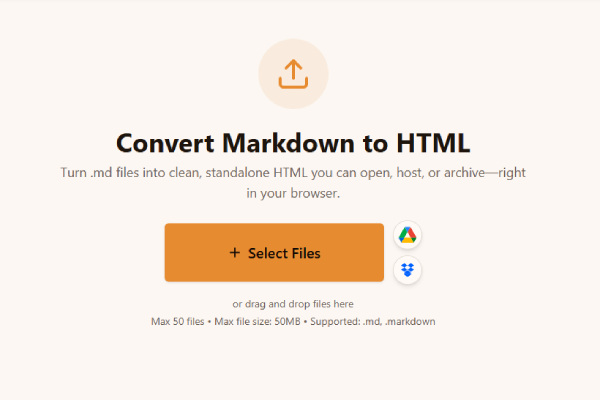
Upload your file to the Markdown to HTML converter. Drag .md or .markdown into the drop zone or browse. Queue multiple files when you batch chapters or specs.
Turn .md files into clean, standalone HTML you can open, host, or archive—right in your browser.
or drag and drop files here
Max 20 files • Max file size: 50MB • Supported: .md, .markdown
How to convert Markdown to HTML
Watch how to turn a Markdown file into HTML with the Asli Tools Markdown to HTML converter.
Convert Markdown to HTML online: upload .md or .markdown, tune YAML and line breaks, download standalone HTML. Browser-based, private, no signup.
You need a Markdown to HTML export that survives real documentation—not a brittle paste into a WYSIWYG editor. I use this flow when README chapters, release notes, and support articles must become static HTML for staging sites, email-safe previews, or handoffs to designers who do not touch Markdown. Upload your file, flip the options that match how you write, and download a single .html document you can open locally or drop onto any host.
Markdown is lightweight markup: hashes for headings, asterisks for emphasis, pipes for tables. HTML is what browsers render. Converting Markdown to HTML means turning those symbols into semantic tags—headings become h1–h6, lists become ul/ol, tables become real table elements, and links stay anchors. That matters when you convert Markdown to HTML for static hosting, CMS imports, or QA previews where structure must match your repo source.
Many converters either strip tables or dump everything into one div of text. Here you keep GitHub-flavored tables, task lists, fenced code blocks, and blockquotes with predictable styling baked into the document head. Everything runs locally in your browser, so drafts about unreleased products never touch a conversion API. Batch uploads cover sprint folders, and you control YAML stripping, hard line breaks, UTF encodings, and whether the first heading drives the browser tab title.
Use this flow whenever you need portable HTML from Markdown:
Upload your file to the Markdown to HTML converter. Drag .md or .markdown into the drop zone or browse. Queue multiple files when you batch chapters or specs.
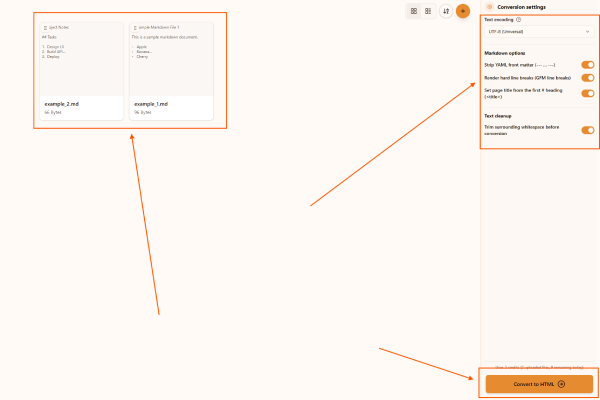
Adjust the output in the Markdown to HTML converter. Pick encoding if the file is not UTF-8, strip YAML when static-site front matter should not appear in HTML, toggle GFM hard line breaks, trim leading or trailing whitespace, and optionally mirror the first # heading into the <title> tag.
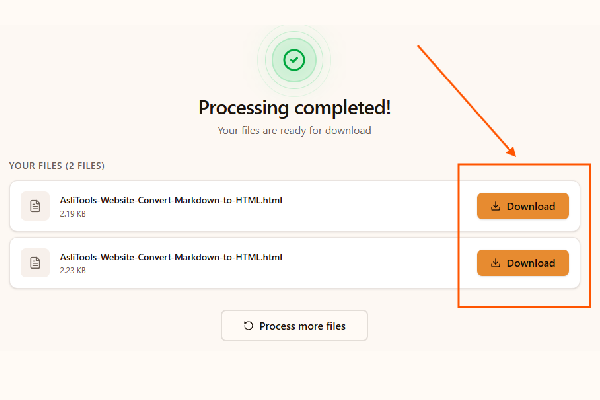
Convert and download with the Markdown to HTML converter. Click Convert to HTML, wait for the in-browser pass, then save each .html file. Your Markdown never uploads to a server.
Open this tool, upload Markdown, adjust options, and download HTML. Core conversion is free and runs entirely in your browser.
Yes. Use a modern Chromium, Firefox, or Safari build. You do not install Pandoc or Node modules for a quick export.
Yes. You receive a standalone HTML file with charset meta tags, viewport meta, embedded print-friendly CSS, and your rendered body content.
GitHub-flavored pipe tables map to semantic table, thead, tbody, tr, and td elements with borders so you can spot issues quickly in a browser inspector.
Triple-backtick fences render as pre and code blocks with monospace styling so snippets stay readable outside an IDE.
These capabilities mirror what disciplined docs teams expect:
These are the stories I hear after teams adopt the flow:
Pasting Markdown into rich editors often mangles tables and strips anchors. Upload-heavy SaaS tools add latency, quotas, and data residency questions. This path keeps you local, preserves GFM semantics, and still produces a portable .html artifact you own end to end.
Small habits keep HTML predictable downstream:
You keep writing in Markdown while stakeholders receive predictable HTML. Upload, tune YAML and line breaks, download, and move on.
Bookmark this page for the next time someone asks for an HTML snapshot minutes before a review.
Have more questions? Don't hesitate to email us:
Yes. Standard use does not require a subscription, and processing stays local in your browser.
Use .md or .markdown. UTF-8 is recommended; pick another encoding only when your editor saved differently.
Yes. Each download is a standalone HTML file with embedded baseline styles.
GFM tables become HTML tables, and links remain clickable anchors.
Try a smaller file, confirm the Markdown parses in your editor, or disable browser extensions that block reads.
Yes. Upload multiple Markdown files in one session.
Yes. We do not upload your Markdown to a remote conversion API.
Enable stripping when front matter should not appear in the exported HTML body.
Fenced code renders inside pre and code with monospace styling.
No. Open the tool, upload Markdown, and download HTML.
We target GitHub-flavored Markdown: tables, task lists, fenced code, strikethrough, and autolinks. Upload .md or .markdown files.
No. Remote image URLs remain img tags pointing to their sources. Local image paths are not inlined—keep assets alongside the HTML or host them separately.
Yes. Conversion runs in your browser without uploading Markdown to our servers.
Yes. Add several files, convert once, and download each HTML output.
No. Static site generators still win for routing, partials, and asset pipelines. This tool shines when you only need a quick HTML snapshot from Markdown.
Validate the Markdown in your editor, reduce file size, or switch browsers if extensions interfere with file reads.
For automation, prefer Pandoc or CI pipelines. This page targets manual, fast, browser-only exports.
We emit a straightforward HTML5 skeleton. Run your preferred validator if your organization requires formal checks.
No. Styles use system font stacks so the file stays self-contained.
Explore more tools that solve similar problems and can help with your next task.

TXT to Word
Convert TXT files to Word format

Markdown to Word
Convert Markdown (.md) files to Word DOCX with tables and links

Markdown to PDF
Convert Markdown (.md) to print-ready PDF in your browser

CBZ to PDF
Convert CBZ comic archives to PDF format

TXT to PDF
Convert TXT files to PDF format with advanced options

IPYNB to PDF
Convert Jupyter notebook (.ipynb) files to PDF

IPYNB to HTML
Convert Jupyter notebook (.ipynb) files to standalone HTML

IPYNB to Python
Export Jupyter notebook (.ipynb) to a .py Python script