
Upload your file
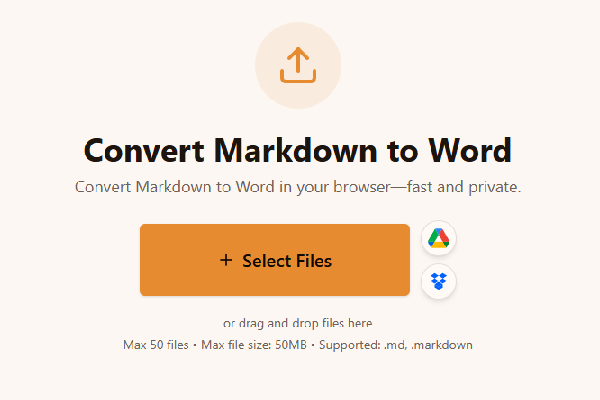
Upload your file to the Markdown to Word converter. Drag a .md or .markdown file into the drop zone or choose files from your computer. You can queue multiple documents when you batch specs or chapters.
Convert Markdown to Word in your browser—fast and private.
or drag and drop files here
Max 20 files • Max file size: 50MB • Supported: .md, .markdown
How to convert Markdown to Word
Watch how to turn a Markdown file into a formatted Word document with the Asli Tools Markdown to Word converter.
Convert Markdown to Word online: upload a .md file, export DOCX or DOC, and download instantly. Browser-based Markdown to DOCX conversion with tables, links, lists, and code blocks—no signup.
You found a Markdown to Word converter that respects structure instead of flattening everything into plain text. I built the export path around real documents I ship weekly: README files, product specs, and client-facing notes that start in Markdown and must land in Word without broken tables or dead links. Upload your file, tune a few options, and download a DOCX you can send to stakeholders who live in Microsoft Word.
Markdown is a lightweight markup language: you write headings with # symbols, emphasize text with asterisks, and add tables with pipes. Word speaks DOCX—a rich format with styles, numbering, and layout. Markdown to Word conversion translates those symbols into Word constructs so editors see real Heading 1–6 styles, bulleted or numbered lists, hyperlinks, and tables they can resize. That matters when you convert Markdown to DOCX for legal, academic, or enterprise workflows where “paste into Word” would destroy your layout.
Many “Markdown to Word” tools either pipe content through HTML (which invites messy round-trips) or dump monospace text that looks like a code dump. Here, parsing stays on the token level, links become true Word hyperlinks, and GitHub-flavored tables export as Word tables. Everything runs locally in your browser, so drafts about unreleased products stay off shared servers. Batch uploads cover folders of specs, and you keep control over fonts, spacing, YAML stripping, and hard line breaks before you click Convert to Word.
Follow this flow when you need a clean handoff from Markdown to Word:
Upload your file to the Markdown to Word converter. Drag a .md or .markdown file into the drop zone or choose files from your computer. You can queue multiple documents when you batch specs or chapters.
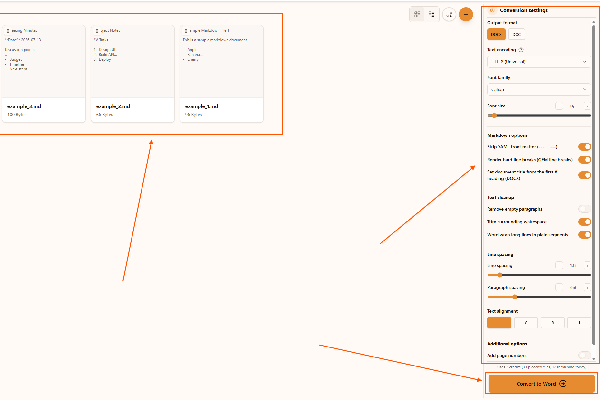
Adjust the output in the Markdown to Word converter. Pick DOCX (recommended) or DOC for legacy systems, choose encoding if the file was not saved as UTF-8, toggle YAML removal when README files include front matter, decide whether GFM hard line breaks should create new lines in Word, and enable the first # heading as the document title when you want metadata without editing Word manually.
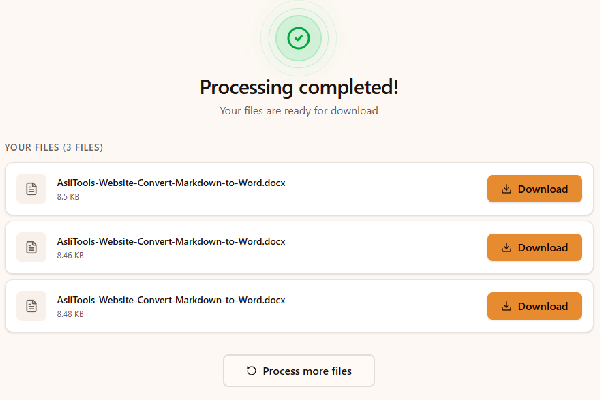
Convert and download with the Markdown to Word converter. Click Convert to Word, wait for the in-browser pass to finish, then download each DOCX. Processing never uploads your Markdown to a server.
Open this tool, upload your Markdown file, choose DOCX or DOC, and click convert. The converter runs in your browser, so you avoid paid desktop bundles for a simple Markdown to Word export.
Yes. Use a current Chromium, Firefox, or Safari browser. There is nothing to install, and you do not need an account.
Yes. DOCX is the default output. DOC remains available when a partner still runs classic Word 97–2003 workflows.
GitHub-flavored pipe tables export as Word tables with borders so reviewers can resize columns like any native document.
External links stay clickable Word hyperlinks instead of plain blue URLs you must re-type.
These capabilities go beyond a basic Markdown paste:
These are the situations where teams email me after switching:
Copying Markdown into Word usually turns headings into Normal style, breaks tables, and strips link semantics. Heavy cloud converters upload your intellectual property to unknown regions and throttle batch jobs. This path keeps parsing client-side, preserves Markdown semantics, and still hands you a familiar DOCX envelope.
Small habits keep exports predictable:
You now have a Markdown to Word workflow that preserves the structure you sweated over in your editor. Upload, tune YAML and line-break behavior, export DOCX, and keep shipping.
Bookmark this page the next time someone asks for a Word version five minutes before a review. You stay in Markdown; they get the DOCX they expect.
Have more questions? Don't hesitate to email us:
Yes. Convert Markdown to Word without a subscription for standard use. Processing happens locally in your browser.
Use .md or .markdown files. UTF-8 is recommended; other encodings are available if your editor saved differently.
Yes. Choose DOCX for modern Word. DOC remains available for legacy compatibility.
GitHub-flavored tables become Word tables, and HTTP links stay clickable.
Try a smaller file, confirm the Markdown parses in your editor, or switch browsers if extensions block file reads.
Yes. Upload multiple Markdown files and convert them in one session.
Yes. Files are not uploaded to a remote conversion API during export.
Enable stripping when README or blog metadata should not appear inside Word.
Fenced code uses monospace formatting with light shading for readability.
No account is required. Open the tool, upload Markdown, and download Word files.
Upload .md or .markdown files, including README-style Markdown. UTF-8 is the default encoding, with UTF-16, ASCII, and Latin-1 available for edge cases.
Yes. DOCX is the modern Word format; DOC is optional. Both answer the same user intent—moving Markdown into Word—without maintaining two separate products.
Pipe tables using GitHub-flavored Markdown become Word tables. If your table is malformed in preview, fix the source first.
Conversion runs in your browser. We do not store your Markdown on a conversion cluster because none is uploaded.
Yes. Add several files, convert once, and download each DOCX separately or use your browser’s download list.
Triple-backtick blocks export as monospace paragraphs with subtle shading so they read like code, not body text.
Pandoc is unbeatable for complex pipelines. This tool targets people who need a fast Markdown to Word export in the browser without installing a CLI toolchain.
Static site generators often prepend title and tag metadata. Stripping keeps that machine metadata out of stakeholder-ready Word files.
Raw HTML blocks appear as annotated text rather than rendered widgets. Embedded images are described with alt text placeholders because binary embedding is not part of this lightweight exporter.
Explore more tools that solve similar problems and can help with your next task.

TXT to Word
Convert TXT files to Word format

Markdown to HTML
Convert Markdown (.md) to standalone HTML with GFM tables and code blocks

Markdown to PDF
Convert Markdown (.md) to print-ready PDF in your browser

CBZ to PDF
Convert CBZ comic archives to PDF format

TXT to PDF
Convert TXT files to PDF format with advanced options

IPYNB to PDF
Convert Jupyter notebook (.ipynb) files to PDF

IPYNB to HTML
Convert Jupyter notebook (.ipynb) files to standalone HTML

IPYNB to Python
Export Jupyter notebook (.ipynb) to a .py Python script