
Upload your file
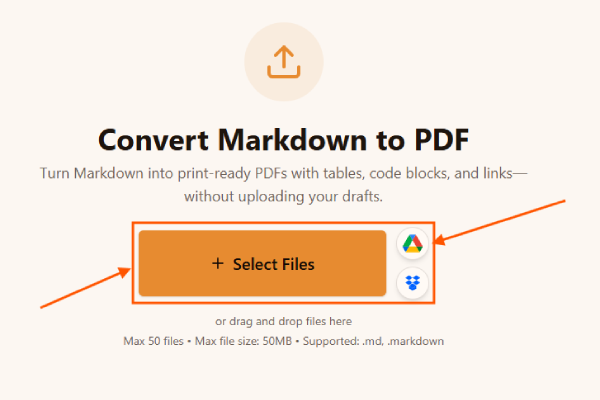
Upload your file to the Markdown to PDF converter. Drag .md or .markdown into the drop zone or browse. Queue multiple files when you batch sprint notes or handbook chapters.
Turn Markdown into print-ready PDFs with tables, code blocks, and links—without uploading your drafts.
or drag and drop files here
Max 20 files • Max file size: 50MB • Supported: .md, .markdown
Convert Markdown to PDF online: upload .md, choose A4 or Letter, set margins, download PDF. Browser-based Markdown to PDF with GFM tables and code blocks—no signup.
You want Markdown to PDF without duct-taping half a dozen CLIs on every laptop. I built this for the same moments I ship release notes, security advisories, and client-ready briefs that start in Markdown but must end as locked PDFs. Upload your file, match page settings to your brand template expectations, and download a PDF your reviewers can open anywhere—even when Markdown is not allowed in email attachments.
Markdown is lightweight source markup. PDF is a fixed-layout exchange format. Converting Markdown to PDF means parsing headings, lists, tables, and code into HTML first, then rasterizing that layout into pages your stakeholders can print or archive. That matters when you convert Markdown to PDF for procurement portals, legal bundles, or classroom packets where HTML is not accepted but PDF is universal.
Some tools screenshot plain text and call it a PDF. Here you keep GitHub-flavored tables, fenced code shading, blockquotes, and hyperlinks through a structured HTML pass before PDF generation. You choose A4 or Letter, portrait or landscape, margins, JPEG quality for the raster stage, and compression—all without uploading Markdown to a black-box API. Batch uploads cover multi-chapter drops, and YAML stripping keeps static-site metadata out of the rendered story.
Follow this sequence when you need a polished PDF from Markdown:
Upload your file to the Markdown to PDF converter. Drag .md or .markdown into the drop zone or browse. Queue multiple files when you batch sprint notes or handbook chapters.
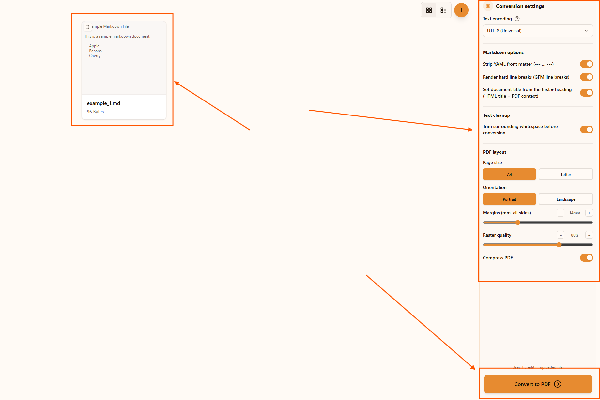
Adjust the output in the Markdown to PDF converter. Choose encoding, strip YAML if README front matter should vanish, toggle GFM hard line breaks, trim whitespace, mirror the first # heading into the HTML title when helpful, then pick A4 or Letter, portrait or landscape, uniform margins, raster quality, and whether to compress the PDF.
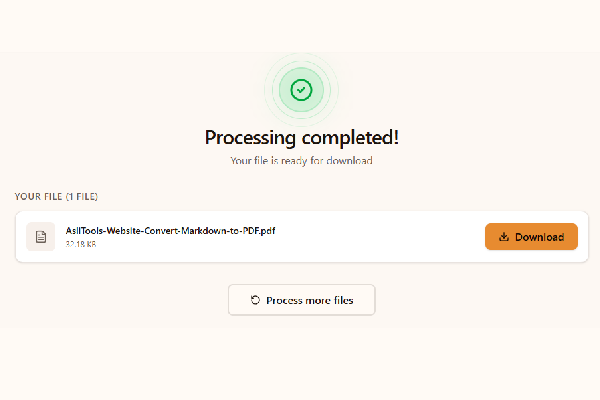
Convert and download with the Markdown to PDF converter. Click Convert to PDF, let the browser finish rendering, then save each file. Your Markdown never leaves the device during conversion.
Open this page, upload Markdown, adjust layout, and download PDFs. Core conversion is free for typical document sizes.
Yes. This path targets quick, browser-only exports. Pandoc remains ideal for complex LaTeX or citation pipelines.
GitHub-flavored pipe tables render as HTML tables before PDF generation, so column structure stays visible in the exported pages.
External links remain clickable in the PDF when the raster pass captures anchor styling from the HTML layout.
The PDF pipeline captures pixels from your layout. Margins keep content off printer non-printable zones, and quality trades file size for sharpness on dense pages.
You get practical controls—not a single mystery button:
Teams reach for this flow in these situations:
Printing straight from an IDE often clips wide tables and ignores page size. Dedicated Markdown to PDF tooling maps structure first, applies print margins, and produces predictable pagination. Heavy cloud converters add upload risk; this route keeps parsing and capture in your browser.
These habits keep PDFs crisp:
You keep Markdown as the source while reviewers get predictable PDFs. Upload, tune layout, download, and move on.
Bookmark this page the next time someone asks for a PDF version at the end of a sprint review.
Have more questions? Don't hesitate to email us:
Yes. Standard use is free and runs locally in your browser.
Use .md or .markdown. UTF-8 is recommended.
Yes. Choose A4 or Letter with portrait or landscape orientation.
GitHub-flavored tables render before PDF capture so structure survives.
Try smaller files, confirm Markdown parses in preview, or adjust margins and quality.
Yes. Upload multiple Markdown files in one session.
Yes. We do not upload your Markdown to a remote conversion API.
Enable stripping when static-site metadata should not appear in the PDF body.
Fenced code keeps monospace styling through the HTML layout stage.
No. Open the tool, upload Markdown, and download PDFs.
We target GitHub-flavored Markdown. Upload .md or .markdown with UTF-8 when possible.
Remote images load if CORS allows; local relative images may not appear unless hosted at reachable URLs.
Yes. Conversion runs locally without uploading Markdown to our servers.
Yes. Upload multiple Markdown files and download each PDF.
No. LaTeX still wins for math-heavy academic PDFs. This tool targets fast business Markdown exports.
We reuse a proven HTML-to-canvas-to-PDF path so complex Markdown layouts match what you saw in the browser.
We rely on system font stacks for portability. Embed brand fonts manually in downstream workflows if you need exact matches.
Use headless Chromium or Pandoc in CI for automation. This page is for interactive, on-demand exports.
Very long pages may need margin tweaks. Exotic CSS color functions are sanitized for canvas compatibility, similar to our HTML to PDF tool.
Explore more tools that solve similar problems and can help with your next task.

TXT to Word
Convert TXT files to Word format

Markdown to Word
Convert Markdown (.md) files to Word DOCX with tables and links

Markdown to HTML
Convert Markdown (.md) to standalone HTML with GFM tables and code blocks

CBZ to PDF
Convert CBZ comic archives to PDF format

TXT to PDF
Convert TXT files to PDF format with advanced options

IPYNB to PDF
Convert Jupyter notebook (.ipynb) files to PDF

IPYNB to HTML
Convert Jupyter notebook (.ipynb) files to standalone HTML

IPYNB to Python
Export Jupyter notebook (.ipynb) to a .py Python script